Can you branch a chat in Claude? Yes — Claude just hides it
To branch a chat in Claude: hover one of your messages, click the pencil (edit) icon, change the wording, and submit. Claude creates a new branch and keeps the old one behind the small </> arrows. You can also click Retry on any Claude reply to fork alternative answers. Every edit and every retry is a real branch — Claude.ai just never draws the tree, so your branches are invisible and easy to lose.
If you want to actually see those branches, the free Nodea Tree for Claude extension draws the hidden tree beside your Claude conversation — and can import the whole thing into a canvas where any node is forkable. The rest of this guide covers why branching matters, every workaround in detail, and the tools that treat branching as a first-class feature.
You’re mid-conversation with ChatGPT or Claude. The AI just gave you a plan. It’s 80% right. You want to know what would change if you reframed the question — but you also don’t want to lose the answer you just got. Today, you have two bad options: edit the earlier message and overwrite history, or open a new chat and re-explain everything from scratch.
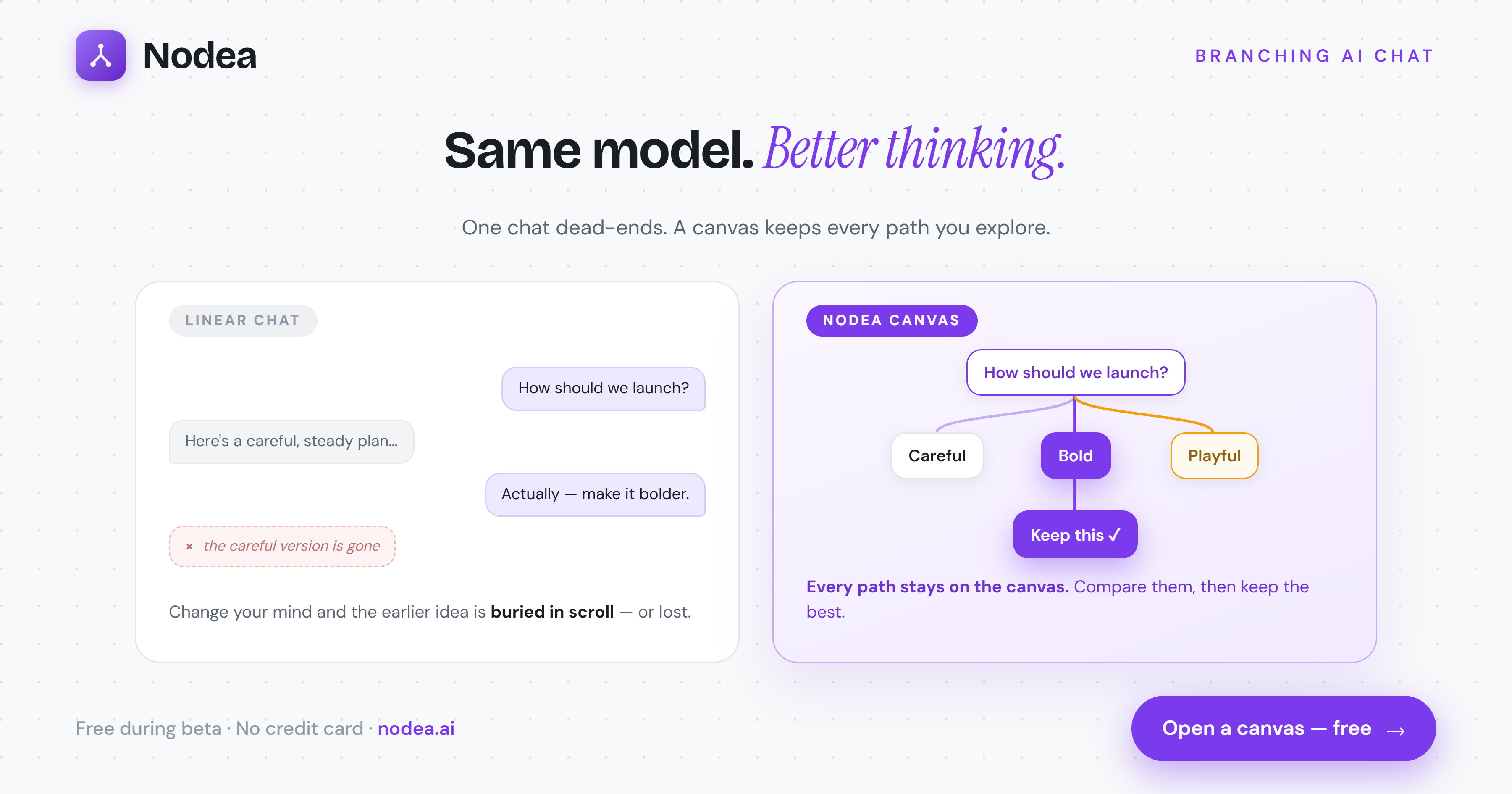
Branching AI chat is the third option. Instead of a linear thread, your conversation grows as a tree. Every message — yours or the AI’s — is a node. Any node can become the starting point for a new branch. Original answers stay exactly where they were; alternatives live next to them.
This guide explains what branching AI chat is, why linear interfaces are the wrong shape for serious thinking, the workarounds people use in ChatGPT today, and the tools that handle branching natively. It’s long. Use the table of contents above.
What is branching AI chat?
Branching AI chat is a conversation interface where each message in your dialogue with an AI model is stored as a node in a tree, and any node can have multiple children. The “current conversation” you see in the chat panel is the path from the root of the tree to whatever node you’ve currently selected. Clicking a different node re-selects a different path.
Other common names for the same idea include tree-of-thought chat, non-linear AI chat, conversation forking, and AI chat canvas. They all describe the same underlying data structure: a directed acyclic graph of messages where any node can be the parent of multiple replies.
The defining properties of branching AI chat:
- Every reply is a fork point. You can branch from the AI’s answer, your own prior question, or any message in between — not just the latest.
- Branches are independent. The AI never sees a sibling branch’s contents. Each conversation is just the path from root to selected node.
- Nothing is overwritten. Editing or regenerating creates a new branch. The original stays in place, visible on the canvas.
- A visual map exists. You can see the full shape of your exploration — which branches went deep, which were abandoned, which converged.
Why linear chatbots fail at exploration
Linear chat — ChatGPT, Claude.ai, Gemini, the OpenAI playground — is built on a list data structure. Each new message appends to the end. This works fine when you’re doing one of two things: asking a single question, or having a focused back-and-forth that moves in one direction.
It breaks the moment you want to explore. Three concrete failure modes:
The destructive-edit problem
You ask GPT for a launch plan. You get one. You hit “Edit” on your original message to try a different angle. ChatGPT does preserve old versions behind a small pagination control — but the UI is hostile to switching between them, the model context for your subsequent messages silently swaps, and you lose the streaming context of the answer you liked. Most people don’t even know the version history exists.
The new-chat tax
The escape hatch is “start a new chat.” But now you’ve thrown away thousands of tokens of context. You re-paste the brief, the constraints, the prior research. By the third or fourth alternative-exploration, you’re spending more time re-setting context than thinking.
The cognitive-load tax
Even if you successfully maintain three parallel ChatGPT tabs,you are the one holding the mental map of which tab represents which branch. You become the database. As soon as you come back tomorrow, the metaphor collapses and you can’t reconstruct what you were thinking.
The root cause is that a list is the wrong shape for thought. Real reasoning is exploratory — you generate candidates, prune some, deepen others, sometimes go back to a discarded path and try again. The interface should be shaped like the thinking, not the other way around.
How to fork a ChatGPT or Claude conversation today
If you’re committed to ChatGPT or Claude.ai and just want branching-style behavior, here are the patterns people actually use. None are great, but they’re what’s available.
ChatGPT: the edit-and-paginate trick
- Find the message you want to branch from.
- Click the small pencil edit icon next to your message.
- Change the wording slightly and submit — a new branch is created.
- Switch between branches using the
</>arrows that appear above the message.
Limitations: you can only branch from your own messages, not the AI’s replies. The UI for switching branches is tiny and easily missed. There’s no overview of all branches in one place.
Claude.ai: the regenerate trick
- Hover the AI reply and click Regenerate.
- Claude generates a new response; use the arrows above the response to switch between versions.
Limitations: this only forks AI replies, not user prompts. You can’t branch into a deeper subtree from an alternative — once you continue the conversation, you’re locked to the version that was active at the time of your next message.
Claude already has your branches. See them.
The free Nodea Tree for Claude Chrome extension draws the branch tree Claude.ai hides — every edit and retry, mapped beside your conversation. One click imports it into a forkable canvas. How it works →
Get the free extension →The duplicate-tab pattern
- Get a conversation to the point you want to branch from.
- Open the conversation in a new tab via “Share” → copy link.
- Continue in each tab independently.
Limitations: only works for shareable / exported conversations. No canvas, no map, no way to come back tomorrow and find a branch without spelunking through your history.
API + your own UI
If you’re a developer, the Claude or OpenAI API gives you full control of the message array on each turn. You can implement branching by storing a tree of nodes in your own database and sending only the relevant path on each call. That’s effectively what dedicated branching tools do.
Skip the workarounds.
Nodea is built for branching from day one — fork any message, any node, with no destructive edits.
Try Nodea free →The tree model: a better mental model for AI chat
Once you stop thinking of an AI conversation as a list and start thinking of it as a tree, three things change.
The unit of work shifts from “chat” to “node”
In linear chat, the conversation is the atom. You think in chats: “the chat where I planned the launch,” “the chat where I debugged the migration.” In branching chat, the node is the atom. You think in moments: “the answer where Claude suggested the viral seeding angle.”
History becomes navigable, not buried
A linear chat’s history is whatever scrolled past. A tree’s history is a structure: you can see all branches at once, see which ones got the most attention (which subtrees are deeper), and trivially return to a discarded path.
The AI’s context becomes precise
The AI never sees siblings. If you have two branches exploring opposite positions, each one’s context is clean — the model isn’t confused by “but earlier you said the opposite.” This is especially valuable for tasks like comparing tones, comparing technical approaches, or running an A/B test on prompt phrasings.
Use cases: when branching beats linear
Branching AI chat shines for any task that involves alternatives. Some specific examples:
Writers
Drafting a headline? Branch the same prompt three times with different tone instructions (“punchier,” “more analytical,” “more concrete”) and compare side by side. You keep all three drafts; the original prompt isn’t consumed.
Founders and PMs
Sketching a launch plan? Branch from the AI’s plan with “Make it bolder,” “Make it cheaper,” “Optimize for retention not acquisition.” You end up with three concrete variants in one session instead of three half-remembered chats.
Engineers
Debugging? Branch from your stack trace with two different hypotheses. The model explores each cleanly. When one branch dead-ends, the other is right there — no copy-paste of the original error into a new chat.
Researchers
Literature review? Branch a summary prompt into multiple angles: “methodology,” “limitations,” “adjacent work.” Each branch goes deep on its own; the root summary stays as your anchor.
Comparing Claude vs ChatGPT
If you use a tool that supports multiple model providers, you can literally branch the same question to different models and read the answers in parallel. This is the cleanest A/B test of model quality you can run.
Tools that support branching AI chat
A small but growing class of tools treat branching as a first-class concept. Brief, honest survey:
- Nodea — branching from day one. Tree-shaped data model, free pan-and-zoom canvas, fork any user or assistant node. Built on Claude. Free during beta. More on how Nodea works →
- ChatGPT’s edit feature — covered above. Works for user messages, hidden UX.
- Claude.ai’s regenerate— works for assistant messages, doesn’t survive past the next turn.
- Nodea Tree for Claude (free extension) — draws the branch tree Claude.ai hides, right beside the conversation, and imports it into Nodea in one click. Install free →
- LangGraph / DIY— if you’re a developer, you can build branching into your own LLM tooling. Cost: weeks of engineering.
How Nodea implements branching
Nodea’s entire data model is two tables: projects (conversations) and nodes (messages). Every node has a parent_id. The conversation rendered in the chat panel is the path from root to the currently selected node. The tree panel is the canvas showing the full structure.
When you click a node, Nodea rebuilds the message array sent to Claude from that path. When you submit a new message, it inserts a new node with parent_id set to the previously selected node, then streams Claude’s response into a child of that. Branching is just “new node, different parent.”
We chose Claude (Haiku, Sonnet, Opus) because Anthropic’s models handle nuanced instruction-following well, which matters when each branch has a slightly different framing. We chose Supabase because row-level security gives us multi-tenant isolation for free. We chose Next.js because streaming Server Components let us deliver token-by-token replies without a custom WebSocket layer.
The full architecture is documented at what is Nodea.
Getting started with branching
If you want to try branching AI chat right now, in order of friction:
- The 30-second option. Open a free Nodea account (or sign in anonymously) and ask any question. After the AI replies, click the answer node in the right-hand canvas and type a new prompt — that’s a branch.
- The workaround option. Go to ChatGPT, edit one of your earlier messages, and use the
</>arrows to flip between versions. Functional, ugly. - The developer option. Build it yourself using the Claude or OpenAI API and a Postgres parent-id schema. Plan for two weeks if you’ve never built a graph UI.
FAQ
Can ChatGPT branch?
Partially. ChatGPT lets you edit a prior user message, which creates a new branch silently behind a pagination control. You can’t branch from an assistant message, you can’t see all branches at once, and the UX is intentionally minimal.
Can Claude branch?
Yes, partially — and it’s hidden. Editing one of your messages or clicking Retry on a reply creates a real branch, but Claude.ai only exposes it through tiny pagination arrows, with no view of the tree. The free Nodea Tree for Claude extension makes those hidden branches visible and importable.
How do I see all the branches in a Claude conversation?
Claude.ai itself has no tree view — branches created by edits and retries stay buried behind per-message arrows. Install the free Nodea Tree for Claude extension to draw the full branch tree beside any Claude chat, or import the conversation into Nodea to keep branching it on a canvas.
What’s the difference between branching AI chat and Tree of Thought?
Tree of Thought (ToT) is a prompting technique where the model internally explores branches of reasoning before committing to an answer — it’s an algorithm, not a UI. Branching AI chat is a UI pattern where the user explores branches across multiple turns. They’re complementary: a branching UI lets you launch ToT-style exploration manually.
Is branching only useful for “creatives”?
No. The clearest use cases are technical: comparing two implementation approaches, debugging with parallel hypotheses, or running multiple migration strategies through the same model. Anywhere alternatives exist, branching helps.
Does branching cost more tokens?
Each branch is an independent conversation, so each one consumes its own tokens. But because branches don’t include sibling context, you don’t pay for context bloat the way you would if you mashed all alternatives into one linear chat. In practice, branching is roughly token-neutral and often cheaper.
What’s the future of AI chat interfaces?
The linear chat box is a 2022 artifact. As models get cheaper and longer-context, the bottleneck is no longer model intelligence — it’s interface. The next generation of AI tools will look more like Figma or a node editor than like SMS. Branching is one step in that direction; canvas, multi-cursor exploration, and persistent workspaces are the rest.