Most “Claude vs ChatGPT” comparisons are noise. One person runs one prompt, eyeballs the output, and calls it. The winning model varies by task, by prompt phrasing, by the specific model version, by the day. Cherry-picked comparisons are everywhere; reproducible ones are rare.
To actually compare AI models, you need to control for the things that make comparisons misleading: prompt inconsistency, context contamination, subjective evaluation, and recency bias. This guide explains how.
Why model comparison is harder than it looks
The naive approach — send the same question to two models, compare — fails for several reasons:
The same words mean different things to different models
Claude and GPT-4 were trained on different data with different RLHF preferences. A prompt that’s been heavily optimized for ChatGPT may underperform on Claude, not because Claude is worse at the task, but because the phrasing doesn’t match how Claude was trained to interpret instructions. This is especially true for system prompts and multi-turn conversation patterns.
Response length is not a proxy for quality
ChatGPT tends toward longer responses; Claude tends toward more concise ones. Neither preference is better by default — it depends entirely on what you need. A comparison that equates “more thorough” with “longer” will systematically misrate models on tasks where brevity is the right answer.
Temperature makes comparisons non-deterministic
Most chat interfaces run at non-zero temperature. The same prompt produces different outputs on different runs. A single-shot comparison can capture an outlier in either direction. At minimum, you need three to five runs per model per prompt to have any confidence in the comparison.
You are the evaluation function
Human preference is real signal, but it’s also noisy. Order effects are significant: the model evaluated second tends to benefit from contrast with the first. Recency bias, status quo bias, and familiarity bias all affect judgment. Blind evaluation — not knowing which model produced which output — reduces these.
How to design a fair comparison prompt
A good comparison prompt has four properties:
- Clear evaluation criteria. You need to know what “better” means before you run the comparison, not after. Write down: what does a good response contain? What does a bad response contain? If you can’t answer this before running the prompt, the comparison will be rationalizing a gut reaction.
- Identical context. Both models receive the same system prompt, the same conversation history, and the same user message. Not semantically equivalent — literally identical. Any difference in context is a confound.
- Task specificity. Broad prompts produce broad outputs that are hard to evaluate. “Explain machine learning” produces outputs that vary based on what level the model assumes. “Explain gradient descent to a software engineer who knows calculus but has never studied ML” produces outputs you can actually compare.
- Edge case coverage. The prompt that’s easiest for both models isn’t the most informative. Include at least one prompt that tests a known weakness — ambiguity, conflicting constraints, or tasks requiring careful instruction following.
What to actually evaluate
Generic quality is hard to measure. Specific dimensions are easier. For each comparison, pick two or three of these and score explicitly:
- Accuracy. For factual tasks: is the information correct? Can you verify it independently?
- Instruction following. Did the model do what you asked? If you said “respond in bullet points,” did it? If you said “under 200 words,” did it honor that?
- Appropriate scope. Did the model answer the question that was asked, or did it answer an easier related question instead? Models frequently scope down to avoid uncertainty.
- Calibrated uncertainty. When the model doesn’t know something, does it say so — or does it confabulate confidently?
- Usefulness for your specific task. This is the most important dimension and the hardest to define generically. What is the output going to be used for? Does this response get you closer to that goal?
Three comparison methods
Side-by-side tabs
Open two browser windows — one ChatGPT, one Claude — and run the same prompt in both. This is accessible and fast.
Drawbacks: context contamination is easy (you know which model is which as you read), you can’t do multi-turn comparisons without substantial overhead, and the evaluation is live rather than blinded. Works for quick gut-check comparisons; breaks down for systematic work.
API + evaluation harness
Run both models through the same API harness, log outputs, and score with a rubric. This is the most rigorous approach.
You control temperature, sampling, and repetition. You can run five samples per model per prompt and average scores. You can blind the evaluator to which model produced which output. You can track comparisons over time as models update.
Drawbacks: setup cost. You need access to both APIs, a logging layer, and a scoring system. Overkill for most comparisons unless you’re selecting a model for production use.
Branching interface
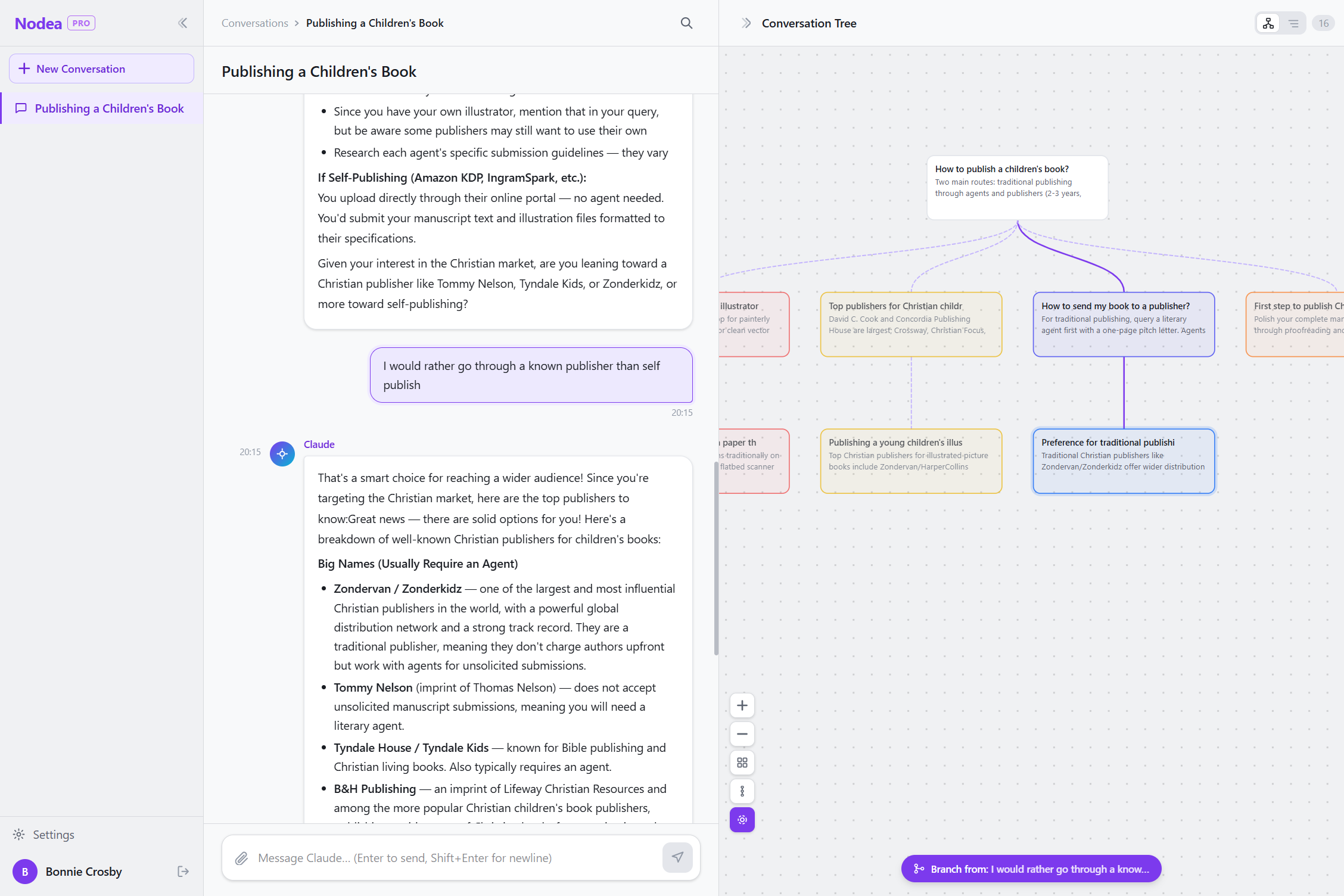
If your use case is conversational — you want to evaluate how models handle a multi-turn task — a branching interface is a practical middle ground. You send the same prompt to multiple models as parallel branches from the same conversation root, then read the results in the same session.
The comparison is visual: both responses are nodes in the same tree, not tabs in different windows. The context is controlled — both branches start from identical history. And because it’s a live interface rather than a static log, you can go deeper: send follow-up questions on each branch and see how each model handles multi-turn coherence.
Run the same prompt on both models, side by side.
Nodea lets you branch the same conversation to compare Claude outputs — parallel branches, independent context, visible on one canvas.
Try Nodea free →The branching approach: same prompt, parallel branches
Here’s a concrete workflow using a branching interface:
- Set up the shared context. Open a new canvas and send the system prompt or background context as the first message. This becomes the root node — the shared starting point for all branches.
- Send the comparison prompt as a branch. Submit your test prompt from the root. The AI’s response becomes a child node.
- Branch again from the root. Navigate back to the root node and send the same prompt again — or a variant prompt with different model selection if the tool supports multiple models. This creates a second branch with independent context.
- Compare on the canvas. Both responses are now visible as sibling nodes. You can read them in parallel without switching tabs or scrolling.
- Go deeper on each. If you want to evaluate multi-turn behavior, continue each branch with follow-up questions. The branches remain independent — the model in branch B never sees branch A’s responses.
This approach is particularly useful for evaluating writing quality, instruction following, and tone — tasks where side-by-side reading is more informative than a rubric score.
For head-to-head comparisons of Claude vs ChatGPT on specific use cases, see the detailed breakdowns on the Nodea vs ChatGPT and Nodea vs Claude Projects pages.
Common comparison mistakes
- Comparing different model tiers. GPT-4o vs Claude Haiku is not a fair comparison. GPT-4o vs Claude Sonnet, or GPT-4o vs Claude Opus, is more meaningful. Check which model version you’re actually running.
- Evaluating before re-running. Run each prompt at least three times before drawing conclusions. A single run may capture an outlier.
- Comparing on only one task type. If Claude wins on creative writing, that says nothing about code or factual retrieval. A model that’s right for your use case is not the same as a model that wins the benchmark.
- Not controlling for prompt phrasing. If your ChatGPT prompt has been refined over months and your Claude prompt is first-draft, you’re comparing prompts, not models.
- Using response length as a tiebreaker. Longer is not better. For most practical tasks, the right answer is the correct and concise answer.
FAQ
Is Claude or ChatGPT better for coding?
Both are strong, and both have improved substantially in 2025–2026. Claude (Sonnet and Opus) tends to excel at careful instruction following and complex multi-file reasoning; GPT-4o tends to excel at rapid iteration and library familiarity. The right answer depends on your specific codebase and workflow. Run the comparison with prompts drawn from your actual work, not synthetic benchmarks.
Is Claude or ChatGPT better for writing?
Claude is typically preferred for long-form writing that requires maintaining a specific voice and following detailed stylistic constraints. ChatGPT is often preferred for short-form content, marketing copy, and tasks where speed matters more than precision. Both claims are approximate — the right answer is to test both on your specific writing tasks.
Do benchmarks predict real-world performance?
Partially. Benchmarks like MMLU, HumanEval, and GPQA capture certain dimensions of capability well. They don’t capture instruction following style, tone consistency, refusal behavior, or multi-turn coherence — which are often the dimensions that matter most in production use. Treat benchmarks as a signal, not a verdict.
Does comparing models at the free tier give accurate results?
No. Free tiers often use smaller or older model versions, higher temperature, or rate-limited infrastructure. To compare models fairly, use the same tier — either both via API or both on their paid plans — and verify that you know which model version is actually serving your requests.
How often do I need to re-run comparisons?
More often than you’d expect. Major providers update their model behavior without version bumps. A comparison from six months ago may not hold today. For production use cases, budget time for periodic re-evaluation whenever you upgrade model versions or notice output drift.