You’re mid-conversation and the AI just gave you something useful — not perfect, but a solid foundation. You want to explore an alternative angle without losing what you already have. In ChatGPT or Claude.ai, your options are: edit a message and overwrite history, or start a new chat and re-explain everything. Neither is good.
“Forking” — creating an independent branch from a point mid-conversation — is what you actually want. There are three real workarounds people use today. This guide covers all three: exactly how to do them, and exactly where they fail.
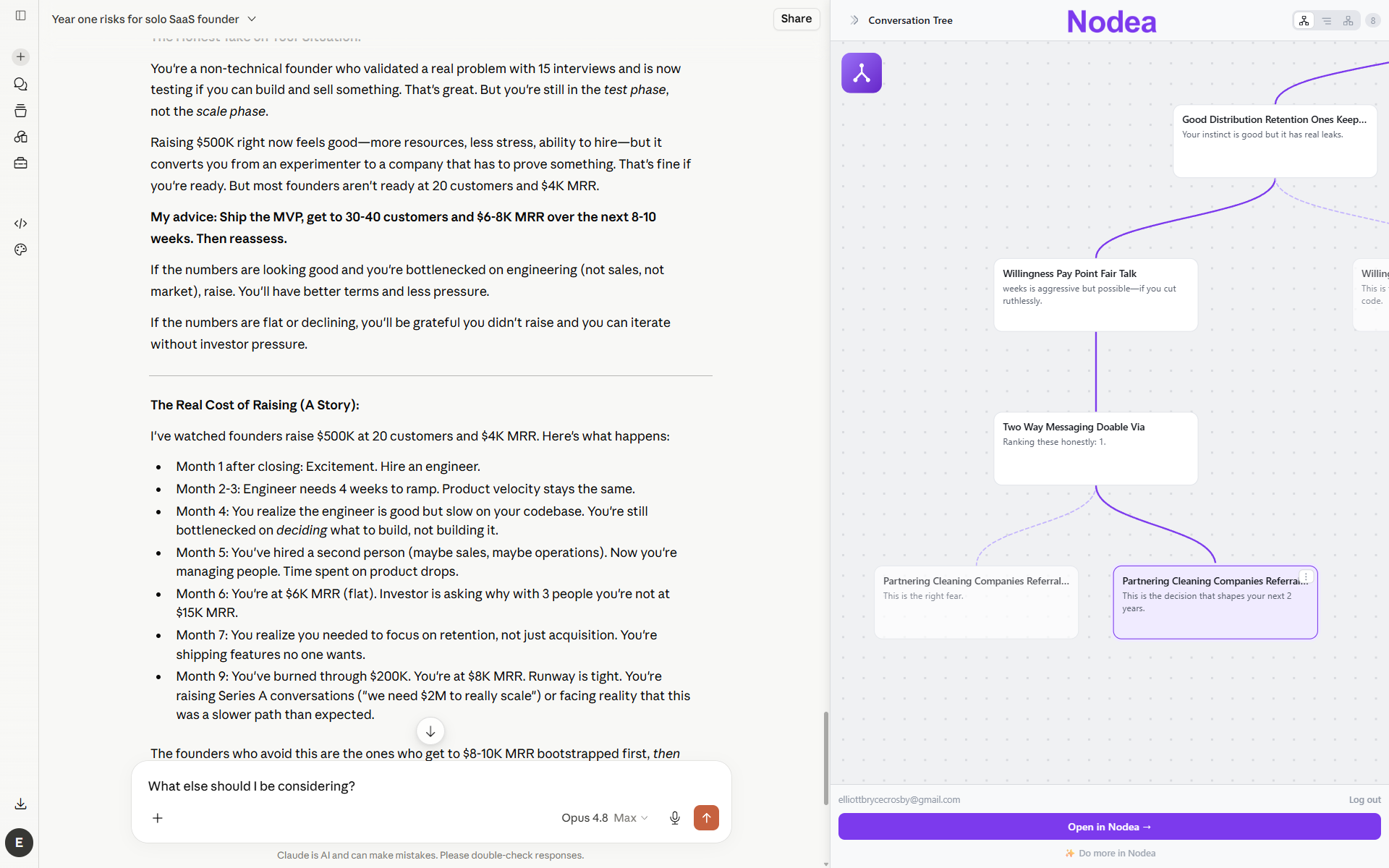
What “forking” a conversation actually means
In software, forking a repository means creating an independent copy from a point in history. You can change the fork without touching the original. Forking a conversation means the same thing: create a new conversational thread that starts from a specific message, leaving the original intact.
The underlying data structure required is a tree, not a list. Each message is a node; a node can have multiple children. The conversation you see in the chat panel is whichever path from root to leaf is currently selected. A true fork creates a new child from an existing node — a second branch off that same point.
ChatGPT and Claude.ai are built on lists. Every workaround below is an attempt to simulate tree behavior on top of a list-based system. The branching AI chat guide explains the full mental model; this post is the practical how-to.
Method 1: The edit-and-paginate trick (ChatGPT)
ChatGPT preserves multiple versions of edited messages behind a small pagination control. Most users never find it. Here’s how it works:
- Scroll to the user message you want to fork from. Hover it and click the pencil (edit) icon that appears.
- Change the message — even a small rewording is enough — and submit. ChatGPT regenerates from that point.
- Look for small
</>arrows that appear above the message. These let you flip between versions. Each version has its own continuation.
What you get: a genuine branch in the conversation, stored in ChatGPT’s servers. You can navigate back and forth between the original and the variant.
What you don’t get: any visual overview of your branches, the ability to fork from an AI message (only your own), a way to see the full shape of your exploration at a glance, or reliable access to old branches if the conversation gets long. The pagination arrows are visually minimal — easy to miss, impossible to see all branches simultaneously.
Method 2: The regenerate trick (Claude.ai)
Claude.ai handles forking from the opposite end: you can create variants of AI replies, not user messages.
- Hover an assistant reply and find the regenerate icon (circular arrows, often in a small toolbar under the response).
- Click it. Claude generates a new response to the same user message.
- Use the
</>arrows above the response to switch between the original and the regenerated version.
What you get: multiple AI responses to the same user prompt, which is useful when you want to compare tone or approach.
The critical limitation: the branch only survives until your next message. Once you continue the conversation, you’re locked to whichever variant was active when you typed. The other variant becomes inaccessible — technically it exists, but there’s no UX to navigate back to it and continue from it independently. You cannot go deeper on both alternatives.
Workarounds are friction, not features.
Nodea is built for forking from day one — branch any node, any message, user or assistant, with the full tree visible on screen.
Try Nodea free →Method 3: Duplicate tabs
If neither edit nor regenerate gives you what you need, the bluntest workaround is duplicating the conversation in a second browser tab and continuing each one independently.
For ChatGPT:
- Get the conversation to the branch point.
- Use the “Share” option (or just copy the URL) to get a link.
- Open the link in a new private/incognito tab or a different browser where you’re also logged in.
- Continue in each tab independently.
For Claude.ai:
- Get the conversation to the branch point.
- Use “Share conversation” (Projects may not support this depending on your plan).
- Open the shared link in a new session and continue from there.
What you get: genuinely independent branches with independent context — neither one sees the other’s messages.
What you don’t get: any connection between the two tabs. There’s no canvas, no map, no way to see both branches at once, and no way to come back tomorrow and reconstruct which tab was which branch without spelunking through your chat history. You become the database tracking which conversations belong to the same exploration.
Where every workaround breaks down
Here’s the honest summary of where each method fails, presented as a decision matrix:
- Edit trick (ChatGPT): can’t fork from an AI message; no canvas overview; branches are easy to lose in long conversations.
- Regenerate trick (Claude.ai): branch dies after your next message; can’t explore both variants independently; no overview.
- Duplicate tabs: no connection between branches; you are the mental tracking system; collapses completely after a few days.
All three share the same root failure: the underlying data model is still a list. They’re UI patches on top of a structure that doesn’t natively support what you’re trying to do.
A second shared failure: none of them show you the shape of your exploration. With a real branching tool, you can look at a visual tree and see which paths got the most attention, which were abandoned, and what the structure of your thinking was. With these workarounds, that information lives only in your head — and it evaporates.
When to stop workarounding and switch tools
Use the workarounds when: you need a quick second opinion on a single response, you’re already in ChatGPT or Claude.ai and the exploration is shallow, or you only need to compare two things and won’t go deeper than one level.
Consider a purpose-built branching tool when:
- You need to explore more than two alternatives from the same point.
- You need to go more than one level deep on multiple branches — asking follow-up questions on each alternative independently.
- You want to come back to the exploration tomorrow and pick up where you left off without reconstructing context.
- You want to compare AI model outputs directly — sending the same prompt to Claude and ChatGPT and reading the answers in parallel. The duplicate-tab method works technically but has no interface for comparison.
- You’re doing research, writing, or decision-making where the branching is the work — not a nice-to-have but the whole point.
Nodea was built specifically for this. The tree is the interface — not a hidden feature behind tiny pagination arrows. How it works →
FAQ
Can I fork a ChatGPT conversation without editing a message?
Not with a first-class feature. The duplicate-tab method lets you effectively fork a conversation by opening it in two tabs and continuing each independently, but there’s no branch relationship between them. They’re just two separate conversations that happen to share the same start.
Does ChatGPT delete old branches when I edit?
No — the old branch is preserved and accessible via the < / > arrows. It just doesn’t look like a branch management system. If you continue a conversation for many more messages, the earlier branch points are still there but harder to find.
Can I fork from an AI’s message in ChatGPT?
Not directly. The edit trick only works on your own messages. If you want to fork from an AI response in ChatGPT, your options are: add a follow-up message and then duplicate the tab, or use a tool that natively supports branching from any node.
Is there a keyboard shortcut for forking in ChatGPT?
No. There’s no keyboard shortcut for the edit or paginate operations — it’s mouse-only, which makes rapid exploration workflows clunky.
How is this different from just opening a new ChatGPT chat?
A new chat throws away all context. The forking workarounds preserve the conversation up to the branch point, so the AI in the new branch already has everything you established before the fork. That’s the whole value: you don’t pay the “new chat tax” of re-explaining your constraints and background every time you want to try a different angle.
What’s the best tool for serious branching work?
Nodea is purpose-built for it — the entire data model is a tree of nodes, and you can fork from any message in either direction. For a full comparison of branching tools, see the tools section of the branching guide.